Free Resources to Learn Motion Design and Motion Graphics
Research
2025-09-19
Motion design is one of the most useful creative skills right now. You'll see it in social videos, explainer videos, and app animations. It's everywhere.
Learning it doesn't have to cost anything. Plenty of free resources can take you from beginner to confident, if you know where to look.
Here are the best free platforms, channels, courses, and tools to get you there.
Why Learn Motion Design?
It's worth answering this first. Why does motion design matter?
- It makes stories easier to follow and more engaging to watch
- It shows up everywhere: marketing, apps, games, and education
- It opens doors to freelance work and creative agency jobs
- It pairs naturally with design, video editing, and animation skills
Now let's get into where to actually learn it.
Top Free Platforms to Learn Motion Design
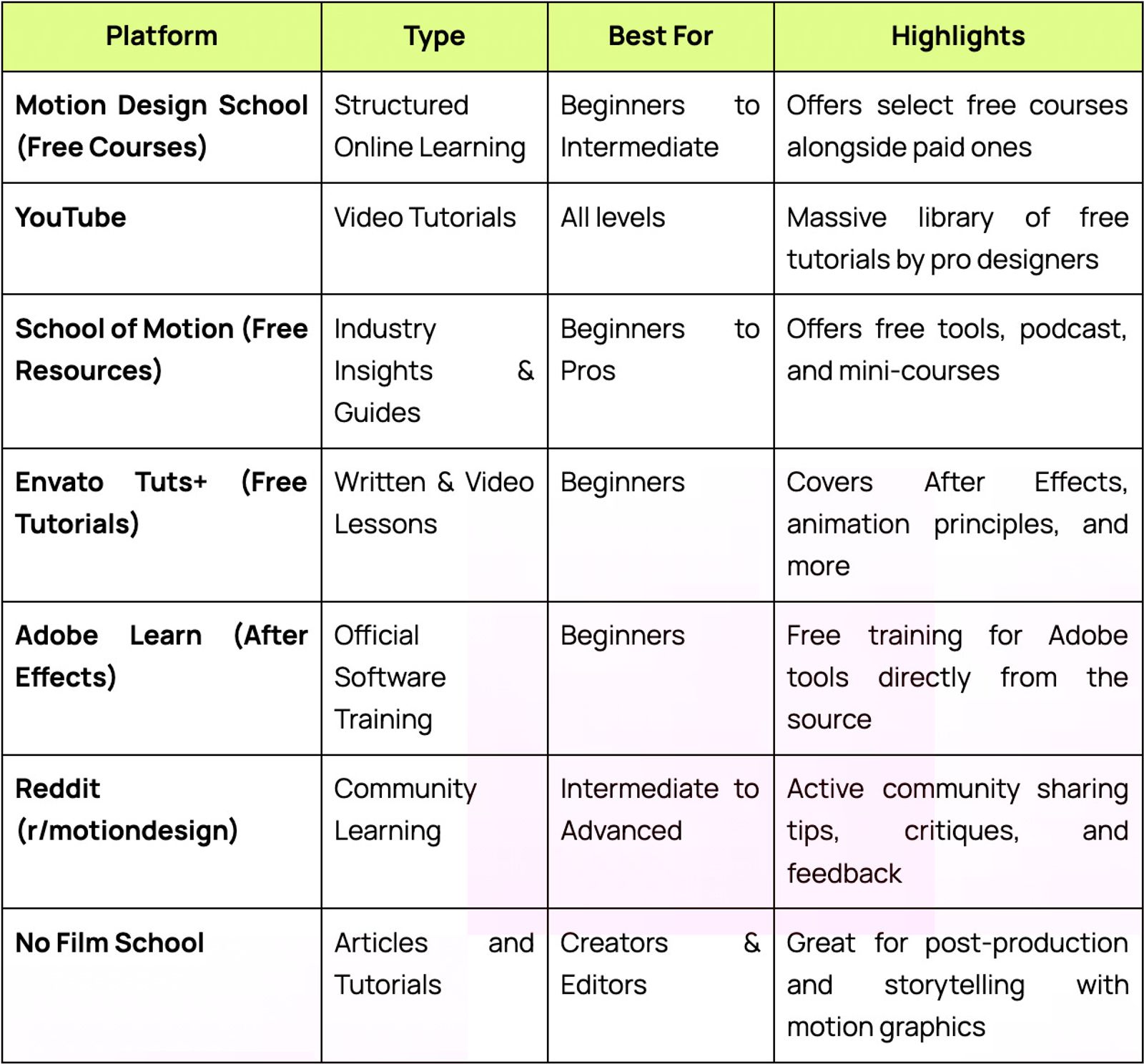
Here is a comparison of some of the most trusted free learning platforms:
Best YouTube Channels for Learning Motion Design
YouTube is still one of the best free classrooms for motion design. Five channels worth following:
Ben Marriott — Focuses on After Effects and real client workflows. Good for seeing how freelance projects actually get built.
Motion Design School — Covers character animation and storytelling. Mixes quick tips with longer lessons.
Mt. Mograph — Advanced After Effects techniques and style frames. Best once you know the basics.
Dope Motions — Short videos on logo and text animation. Easy to watch one a day and practice along.
Evan Abrams — Teaches After Effects fundamentals from scratch. Good if keyframes and easing still feel confusing.
Free Motion Design Courses and Workshops
Tutorials teach you moves. Courses teach you how the pieces fit together.
School of Motion – Path to MoGraph — A free 10-day email course. Covers basics, software choices, and career paths.
Motion Design School – Free Crash Courses — Occasional free lessons on After Effects basics and character rigging.
Envato Tuts+ – Motion Graphics Fundamentals — Written and video tutorials on animation principles and After Effects.
Adobe After Effects Beginner Training — Adobe's own free series. Covers the software feature by feature.
Free Tools and Assets for Practice
Watching tutorials only gets you so far. You learn motion design by doing it.
- Mixkit — free templates and stock video
- Motion Array (Free Library) — free templates, presets, and overlays
- LottieFiles — edit lightweight JSON animations to learn by hand
- Google Fonts + Adobe Fonts — pair solid typography with your animations
- Unsplash + Pexels — free images and clips for practice projects
A Simple Learning Path for Beginners
Follow this order instead of jumping between random tutorials:
- Learn the basics. Keyframes, easing, timing, spacing. Then contrast, alignment, hierarchy.
- Pick one piece of software. Most professionals use After Effects. Blender, DaVinci Resolve Fusion, and Canva Pro work too for lighter projects.
- Follow tutorials and rebuild them. Logo animations, title sequences, simple transitions. Copying good work teaches you fast.
- Practice daily, even five minutes. Try small prompts, like animating a bouncing ball.
- Join a community. Reddit, Discord, and forums like Motion Hatch are good for feedback.
- Start a portfolio early. Personal projects count. Show range, not just your best piece.
FAQ
Do I need expensive software to start?
No. Canva Pro and Blender are free or low-cost and teach the fundamentals fine. Move to After Effects later.
How long before I can freelance?
Most people need a few months of steady practice before a first paid project. Consistency matters more than speed.
Is this hard to learn without a design background?
No. Start with keyframes and timing, then build toward storytelling once the basics feel natural.
You don't need a formal degree or expensive software to start. You need a few good resources and the habit of practicing often.
Pick one channel, one course, and one tool from this list. Start there. The rest follows once you're building something every week.